Simulators
What is a simulator? 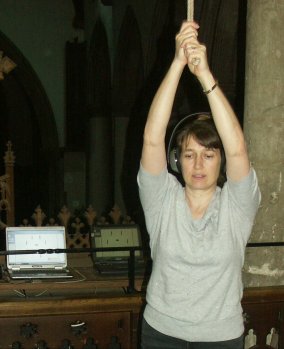
A simulator behaves sufficiently like something else to be useful, usually for training. Simulators help people learn to fly aircraft, to drive trains and to operate complex industrial plant. They have realistic controls, a (hidden) model of the dynamics, and realistic feedback (visual, aural, tactile).
The picture shows a trainee with a bellringing simulator in the tower at All Saints Wokingham
Bellringing simulators
Simulators for bell ringers have been around since the 1970s. The late Peter Cummins, built one and used it to develop his own ringing, and also to teach others. His early simulators (some of which are preserved in the Bellfoundry museum) used discrete electronic logic but modern simulators use software running on a general purpose computer. A practical simulator needs connecting to something physical for the trainee to 'ring'. Often this is a real bell with the clapper silenced and sensors on the wheel that detect the bell's rotation and send a pulse to the simulator when it would normally strike.. The simulator uses this to trigger the sound, which is mixed it with the sounds of the other (simulated) bells, all sounding perfectly in sequence. The trainee has to ring the bell and adjust the timing of its swing to fit in with the sound of the other bells. Any machine that `feels like a bell' to the ringer on the end of the rope can beused instead of a tied bell, either a dumbbell, a suitable rotating mass fitted with a wheel and rope, or a 'bell simulator', a machine that can create a realistic combination of movement and force on the to make it 'feel like' a bell to the ringer.
The simulator has several advantages: Training doesn't need a room full of (patient) ringers to ring the other bells. The simulated bells ring in perfect time, so the trainee only has to worry about his/her own mistakes. Ringing with a simulator as part of a training regime helps the ringer to develop a rhythmic style of ringing, and the ability to listen as the main feedback for accurate striking.
To a non-ringer the last benefit might not seem so obvious but it is. Skillful ringing requires a blend of rhythmic, aural and visual skills, which complement each other. But since we are visual animals visual input can dominate to the detriment of other senses. When learning to ring it can be tempting to rely too much on the visual cues from the movement of the other ropes, which leads to less accurate ringing. 'Ropesight' – making sense of the movement of the other ropes to work out what is happening around you – is a valuable skill for ringers, but the rope movement doesn't always accurately reflect the timing of the striking.
A bellringer needs several sets of skills, not all of which can be helped by a simulator:
- Bellhandling skills are about the relationship between the ringer and the bell. They involve co-ordination of hands and arms in order to control a bell swinging full-circle on the end of a rope. For a cycling analogy, think about staying balanced on the bike without falling off.
- Timing skills are about the relationship between when the ringer's bell strikes and when all the other bells strike. They involve detecting any discrepancy in the sound sequence and making small, accurate corrections to the bell's swing so that it fits properly into the overall sequence. For a cycling analogy, think about being able to cycle in a group, keeping equal distances between all cycles.
- Dynamic bellhandling skills are about controlling the bell accurately when the sequence changes. They combine and extend the skill sets above. For a cycling analogy, think about cycling in formation round corners and obstacles. (A closer analogy would be cycling in formation with each cyclist continually overtaking or being overtaken by other cyclists in accordance with a predetermined set of rules, but that might stretch your imagination.)
- Method skills are about learning and executing complex sequences. They are mainly cognitive skills, overlaid on the above motor skills. For a cycling analogy, think about learning complex routes for navigation, or patterns for when to overtake and when to drop back – and then performing them with no visual aids or markings.
Subsequent developments
Since the advent of the basic ringing simulator there have been many further developments, some of which had unexpected side effects.
- Performance feedback – Feedback is a powerful training technique. With the original simulators, there was no feedback on the trainee's performance other than what (s)he managed to hear while ringing, and what the tutor said afterwards. More recent simulators record the trainee's performance so that it can be reviewed afterwards, typically as a graphical display that makes it easy to see how far each blow deviated from the ideal time, and whether there were any consistent patterns to the errors.
- Multi-bell interfaces – You only need one physical bell to ring with a simulator, but it is convenient to be able to choose which one is best suited to the trainee's needs. Fitting sensors on more than one bell gives a choice of using a heavier or lighter bell, and fitting them to all the bells, with the ability to select any one as input to the simulator, gives complete choice.
- 'Silent practice' – Before long someone worked out that you could use this arrangement to allow all the bells to be rung together as normal, but for 'silent practice' where the sound isn't heard outside the tower. The clappers are all tied and the simulator makes all the sounds, but doesn't do anything else. This become popular because it is cheaper than fitting sound control shutters into the tower (like here). The use of simulators as 'electronic' sound control had the unwanted side effect that for many ringers this secondary use completely eclipsed the original use as a training aid. So despite simulators being more widely fitted in towers, the growth of their use to train basic ringing skills was slower.
- Visual displays – Some early simulators had no visual display, or a minimal one just to operate the controls, but simulator software running on general purpose computers usually provides some display to represent the ringing. In some situations this can be useful, most notably to help a solo user to re-orientate and recover after making a mistake while ringing a method. The first displays to emerge showed the numbers of the bells laid out as they would be in a book of ringing methods, but with the numbers appearing in real time as they strike. This was followed by displays, often in a circle, with a representation of each bell changing state between 'handstroke' and 'backstroke' (opposite ends of a bell's swing). As noted above this could be useful for orientation and correction while practising a method, but it can have unwanted side effects if used inappropriately. Trainees who look at the screen while ringing can be drawn into over reliance on visual input for their timing, which undermines one of the simulator's main benefits, ie encouraging reliance on rhythm and listening for the timing.
- Visually simulated ringers – The availability of increased computer power and better graphics encouraged developers to offer more realistic visual representations of the actions of simulated ringers along with the sound of the simulated bells. On a large screen, or if projected, this comes much closer to the live experience of ringing with other (perfect) ringers. So as well as using a simulator to help ringers develop core skills of reliance on rhythm and listening (which is best without visual input) it can also be used to help ringers to integrate the visual experience of ringing with others, especially where opportunities to practice with competent ringers is limited. Again, this advance can have the unintended side effect of eclipsing the simulator's valuable role in helping to develop core rhythm and listening skills. By analogy it's like cricketers neglecting net practice and just playing games, or singers not bothering to practice scales.
- Visually simulated bells – Virtual Belfry can also show the bells viewed from above, with realistic movement of the simulated bells in real time. This is a good way to show bells in action to non-ringers or trainees since most towers do not permit the bells to be viewed while ringing, but is not used as a training tool.
- 'Ringing' from the keyboard – Many simulators allow you to 'ring' by pressing keys instead of using a sensor attached to a bell. This removes an important part of the simulated ringing experience – the feel of the act of ringing and the dynamic behaviour of the bell –with an action that is nothing like ringing a bell. Even the timing is different, since the button is pressed at the instant the bell sounds, whereas the definitive action on the end of a bellrope is a second or two earlier. It has of no value for training ringers in the skills of accurately timed bell control, but it is widely used to permit ringers to exercise the cognitive skills of method ringing (the 4th skill in the list above). It is attractive because it requires no hardware apart from a standard computer (or pad or smart-phone) so it can be used anywhere, not just in the tower. Some people adapt to pressing keys rather than being on the end of a rope but others find it very unnatural and much harder to do well.
- Dumbbells – Although many simulators use the rope, fittings and physical mass of a real bell to provide the dynamic feel when ringing, it doesn't have to be a real bell as long as the mechanical behaviour is reasonably similar. The generic name for something designed to emulate a bell's behaviour like this is a 'dumbbell', and many ingenious variants have been produced. All have a rope, wheel and some sort of rotating mass, but they come in all shapes and sizes, as designers have sought to meet different criteria, including portability, lightness, minimal 'tower' movement or easier handling for novices . Some people argue that since a dumbbell mechanically simulates a bell's dynamics then it is a 'simulator', but that can be confusing for those not in the know, and most ringers refer to a ringing simulator (that simulates the experience of ringing together with other bells) and a dumbbell (as a substitute for a physical bell).
- Going mobile – In 2010, Mobel , a version of Abel that runs on an iPhone, was released. This allows ringers who use the key pressing technique to practice in places where they couldn't otherwise. It also allows ringers to 'look up' the diagram or line of a method without carrying round a large book. Mobel has also been used to help explain ringing to strangers when the topic arises in conversation. It was later adapted to run on other types of smart phone.
- Handbells – Ringing simulators have always been capable of being connected to a pair of dummy handbells, instead of to a tower bell (or dumbbell). In the 1980s Peter Cummins fitted a pair of handbells with microswitches on their clappers so that he could ring with his simulators, see his wife ringing with them. Bell control is much simpler with handbells than with a tower bell, so the emphasis when using a simulator with handbells is much more towards personal practice of change ringing. Several people have made their own dummy handbells to plug into a simulator, but see below.
- Ringing with motion controllers – When small, cheap, hand-held motion controllers became available for games boxes, it wasn't long before someone realised that they could be used as dummy handbells. In 2009 Graham John produced Handbell Manager software to enable ActionXL motion controllers to work with a ringing simulator, and the leading simulator developers adapted their products to match. This avoided the unnatural 'key pressing' action, which some handbell ringers find difficult, and enables them to use the sense of rhythm that they get from their hands moving while ringing. The controllers are much lighter than most handbells, but some people have added weights and/or fitted them with longer handles to make the action closer to ringing a real handbell.
- On-line ringing –
- E-bells – The development of online ringing during the Covid pandemic increased the demand for controllers and ringers had soon bought all the ActionXL controllers made. There wasn't a suitable alternative, and that provided the spur for a group of ringers to develop eBells, which look like real handbells but have a motion controlled built in.
- Integrated software – Software is so versatile, it is tempting to make it do more and more. Some modern simulator software forms a small part of a more complex overall product that can do lots of ringing related things as well as simulating ringing. There are pros and cons of this approach.
Links
Contact me if you would like to know more, or if you want help.